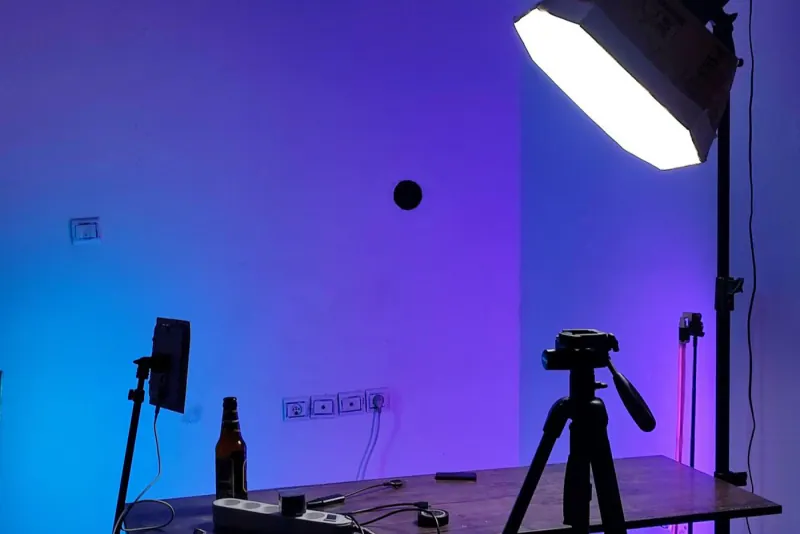
A good product photo for social media comes down to soft, side lighting, a clean background, your phone locked on a tripod and several shots per product: white background, in use, detail and scale. Each channel calls for a different format, like vertical for Instagram, square for the WhatsApp catalog and a white background for Mercado Libre. When the product is expensive, shiny or the backbone of your online store, a professional shoot is worth it.
- Light matters more than the camera: use diffused window light, not direct sun.
- A tripod and a consistent background make your whole catalog look professional.
- Take at least four photos per product: white background, in use, detail and scale.
- Edit to correct, not to change colors; a misleading photo leads to returns.
- In La Laguna, watch out for dust, heat and harsh midday light.
What makes a product photo sell
A product photo has a very specific job: help the customer understand what they're buying and trust that what they'll receive matches what they see. It doesn't need to be artistic; it needs to be clear, accurate and consistent.
Photos that sell share these traits:
- The product is the star. It fills a good part of the frame, it's in focus and it doesn't compete with objects around it.
- The colors are true to life. If the blouse is burgundy, it looks burgundy, not red. "It wasn't the right color" returns are expensive.
- There's context. Besides the clean shot, at least one photo shows the product in use or next to something that gives a sense of scale.
- The catalog looks uniform. Same background, same light, same angle. That signals there's a serious business behind it.
For many businesses in Torreón, the photo catalog is the asset they reuse the most: on the website, in the WhatsApp catalog, in ads, on Mercado Libre (Latin America's largest online marketplace) and on their Google listing. It's worth doing right once.
The minimum gear (and what you don't need)
You don't need to buy a professional camera to get started. A recent phone, used well, is enough for social media and catalogs. Here's what actually makes a difference:
| Level | Gear | Good enough for |
|---|---|---|
| Basic | Phone, window, white poster board, foam board as a reflector, tape | WhatsApp catalog, posts and stories |
| Intermediate | Tripod with a remote, a light box or two LED lights with diffusers, colored backdrops | Online store, Mercado Libre, ads |
| Professional | Camera with a macro lens, studio strobes, seamless backdrop, retouching | Shiny products, jewelry, food, large campaigns |
What you don't need at first: filters, trendy textured backdrops or apps that "enhance" photos automatically. The tripod is the investment with the best return, because it locks the angle and lets you repeat exactly the same shot for every product.
A cheap trick: bend a sheet of white poster board into a curve, resting against the wall and the table. That creates a background with no corner, the famous "infinity sweep," and the product seems to float on white.
Light in La Laguna: use the sun without blowing out the photo
Torreón has light to spare, and that's exactly the problem: midday sun is harsh, casts hard shadows and blows out the whites. A few rules that work here:
- Use indirect window light. Place the product near a window that doesn't get direct sun. If it does, cover the window with a thin white curtain or tracing paper.
- Shoot in the morning or late afternoon. The light is softer and more even. Avoid midday, especially from May to August.
- Bounce the light. A piece of foam board or white poster board on the side opposite the window softens the shadows.
- Don't mix light sources. Window light plus a yellow bulb that's on paints the product in two colors. Turn off the room lights.
- Watch out for dust. During dust-storm season, dust shows up dramatically in close-ups. Clean the product and the background right before you shoot.
- Watch out for heat. Chocolates, candles, cosmetics and food lose their shape quickly. Shoot them early in a cool room.
The four photos every product needs
A single photo is rarely enough. For each product, aim to have at least these shots:
- White or neutral background. The main photo for your catalog and marketplaces. The whole product, centered and well lit.
- In use or in context. The bag on a shoulder, the dish on the table, the chair on a patio. It helps customers picture themselves with the product.
- Detail. Texture, stitching, finish, ingredients, label. It answers the question "Is this good quality?"
- Scale. The product next to a hand or a familiar object. It prevents the classic complaint "I thought it would be bigger."
If you sell products with variants, shoot each color separately; don't count on customers imagining the shade. And if your product is easier to understand in motion, add a short vertical video of ten to fifteen seconds: it works for stories, reels and sending directly over WhatsApp.
For clothing, food or services, also think about photos with people. If you use customers or employees, get their written permission before publishing.
Formats by channel
Each platform crops and displays photos differently. Shoot with some space around the product so you can crop to any format:
| Channel | Recommended format | Notes |
|---|---|---|
| Instagram and Facebook posts | Vertical 4:5 or 3:4 | Takes up more of the phone screen than a square |
| Stories and reels | Vertical 9:16 | Leave the top and bottom clear for the app's text overlays |
| WhatsApp catalog | Square 1:1 | Center the product; the thumbnail is small |
| Mercado Libre | Square with a white background | In many categories the main photo must have a white background and no text |
| Online store and website | The same format across the whole catalog | Consistency and small file sizes so pages load fast |
| Google listing | Real photos of the product and the store | No promotional text on top |
If you sell on marketplaces and in your own store, read our comparison of Mercado Libre vs. your own online store, because each channel has different image rules. For your chat catalog, our guide to the WhatsApp Business catalog explains how to organize it.
How to run a DIY photo shoot in one afternoon
What makes a photo shoot drag on forever isn't the shooting, it's the improvising. With a little organization you can photograph dozens of products in an afternoon:
- Make a shot list. A sheet with every product, its variants and the four shots you need. Check them off as you go.
- Set up once. Table by the window, curved poster board, reflector and tripod. Mark with tape where the product goes and where the tripod goes.
- Prep the products ahead of time. Clean, ironed, price tags removed and lined up in the order of your list.
- Shoot by type of shot, not by product. First all the white-background photos, then all the details, then the context shots. That way you aren't rearranging the set every few minutes.
- Review on a big screen. Before you take the set down, check the photos on a computer; on a phone screen you won't notice blur or smudges.
- Name and back up. Move the photos into one folder per product, with descriptive names, and save a copy to the cloud.
Repeat the same setup every time new merchandise arrives. In a few weeks you'll have a uniform catalog that looks like it belongs to a big retailer.
Quick editing and file names
Edit to correct, not to transform. Any free phone editor is enough to:
- Straighten and crop to the channel's format.
- Adjust exposure and white balance so the background looks white, not gray or bluish.
- Add a touch of sharpness, without overdoing it.
- Remove a smudge or a bit of lint, but never change the product's color.
Save a lightweight version for the web. A photo weighing several megabytes slows down your site, and that hurts both sales and your Google rankings.
A detail almost nobody gets right: the file name and the alt text. "IMG_4532.jpg" tells Google nothing; "handmade-clay-coffee-pot-torreon.jpg" does. In your online store, describe each photo in the alt text field using natural language. It's one of the must-have features of an online store, and it helps you show up in Google Images.
When to hire a professional shoot
Taking your own photos works for day-to-day content. A professional shoot is justified when:
- You're launching or relaunching your online store and need a complete, uniform catalog.
- Your products are shiny, transparent or very small: jewelry, glass, cosmetics, metal parts.
- You sell food and want it to look mouthwatering in ads.
- You're rebranding and the photos need to match the new brand; our guide to branding for family businesses explains how it fits together.
- You need photos and video of your team, your store or your plant for the website and social media.
What drives the cost of a shoot up or down is the number of products, how many shots per product, whether you need models or a location, and the level of retouching. A good middle ground is a professional shoot for your core catalog and your own photos for everyday content.
If you'd like to plan it with us, take a look at our photo and video service in Torreón; for an example of a catalog that sells online, see the Tostadores Altamira case study.